Dynamic pricing integration
Change a price in one place, update every store at once
From the POS, the API or the panel: the store-based price table changes and the digital menu boards show the new price within seconds. No printing, no calling the store, no mismatch between the register and the screen.
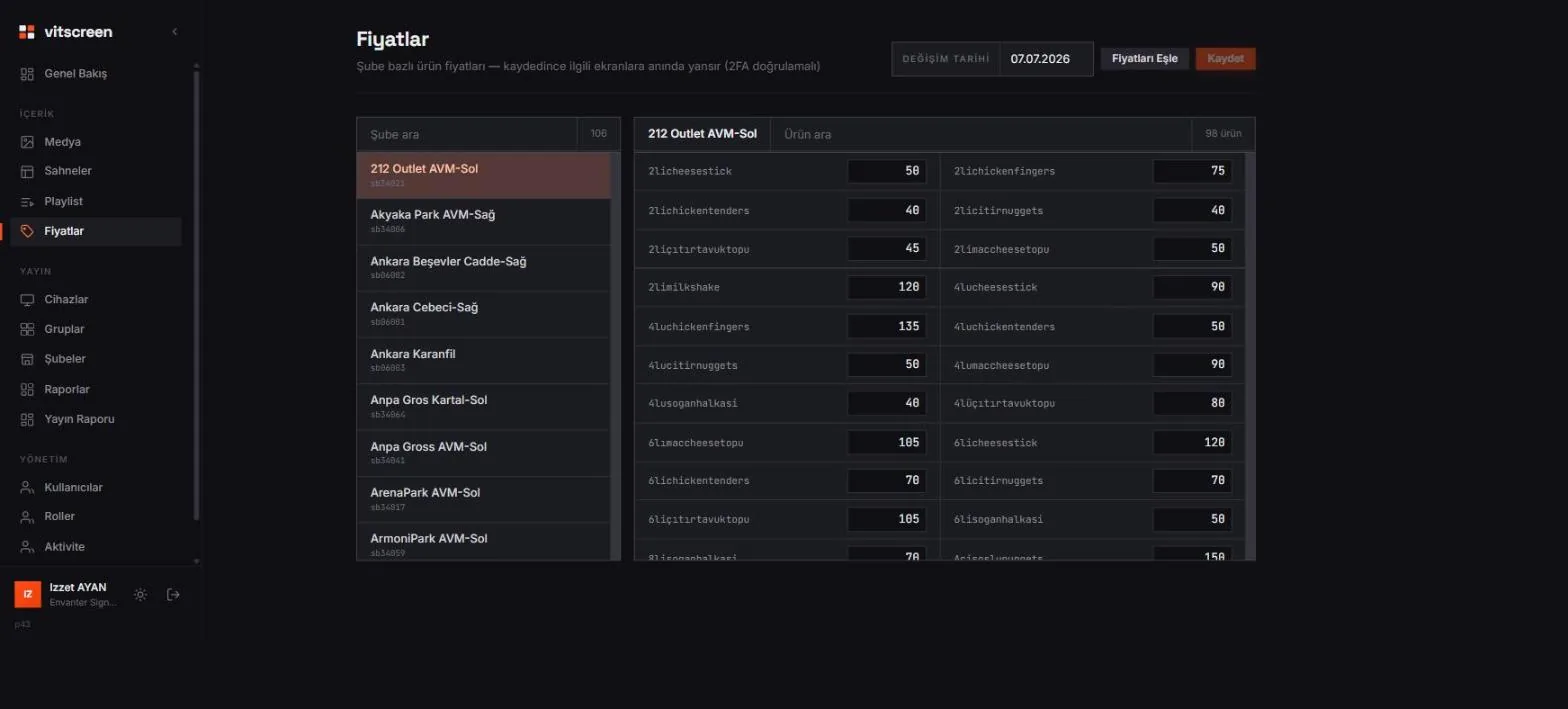
The panel's pricing screen: stores on the left, the selected store's product prices on the right. Captured from a real chain.
Three sources, one table
Connect prices wherever they come from
Screens are fed from a single store × product price table. You can update it in three ways; all go through the same approval and publish step.
Table in the panel
Pick the store, type the product's price, save. You see how many changes you made; a verification code is requested the moment you save, and the price goes out to that store's screens.
POS sync
The register's price list is pulled into the panel; changed items appear with old / new prices, you approve, the screens update. A ready-made connector is available for 360restoran.
REST API
ERP, inventory software, your own database or a script fed from Excel: send the changed prices in a single PATCH request and the system distributes the rest.
How it works
Product code + store code = the right price on the right screen
Map the product code
Every price field in a scene is bound to a product code (e.g. BURGER-01). If the code matches the one in your POS, there's nothing more to do.
Assign the store code
Every screen belongs to a store; the store code (e.g. SB-014) decides which price column goes to that screen.
Change the price
In the panel, via POS sync or through the API. You choose the source; nothing changes on the screen side.
Approve and publish
Going live is a separate permission and asks for two-step verification every time. Then the screens show the new price within seconds.
POS and register integration
Changed at the register, changed on the screen
With POS sync, the register is the source. You click "Match prices" in the panel; the system pulls the POS price list, compares it with your table and lists only the changed items with old → new prices. You approve, it's published.
- Unchanged items are left alone; only the differences are applied
- Pre-publish check: old / new prices side by side
- Two-step verification to publish, every time
- 360restoran ready; other POS systems via API
REST API
One request, the whole fleet
Send the changed prices from your own software. The body is store → product → price; items you don't send stay as they are. An optional price change date updates the "valid from" label in your scenes.
PATCH https://api.vitscreen.com/v1/pricing
Authorization: Bearer <access-token>
X-2FA-Code: 482 913
Content-Type: application/json

{
  "data": {
    "SB-014": { "BURGER-01": "245", "MENU-02": "310" },
    "SB-021": { "BURGER-01": "235" }
  },
  "changeDate": "2026-09-08"
}
Requires the access token of a user with write permission and the current verification code; we share the integration docs during onboarding.
Why a digital menu board
The cost of changing a price drops to zero
No more printing and installation costs
Every price change used to mean printing, shipping and a ladder in the store. On a digital menu board the change is made centrally; nobody in the store touches anything.
The register and the screen never disagree
A price on the menu board that differs from the receipt is an argument with a customer. With POS sync there is one source: whatever the register says, the screen shows.
Different prices per store
The mall store and the high-street store show the same scene with a different price column. One design, a price per store.
Menus by time of day
Breakfast, lunch, happy hour: the schedule publishes a different scene by day and time slot, and the price list changes with the scene.
Who changed what, and when
Every price publish lands in the activity log. If a wrong number went live, within minutes you can see who did it and which stores were affected.
The menu stays up even without internet
Prices and content are cached on the screen. If the store loses its connection, the last published menu keeps playing; it updates when the connection returns.
Who it's for
Any business whose prices change often
Restaurant and café chains
Menu boards, order screens, price lists above the counter. Prices per store, menus by time of day, one source with the POS.
Franchise systems
Head office manages the design and the master list; the franchise store sees its own column. The store manager gets permission to monitor their screen, while pricing stays with head office.
Retail and grocery
Promotional prices on shelf and window screens, set centrally and scheduled by day and time. The promo scene ends with the schedule and the regular menu comes back on its own.
Businesses that connect their own data
Any business model that produces prices from an ERP, inventory software or a spreadsheet connects through the API. The source stays with you, distribution is on us.
Frequently asked questions
About dynamic pricing
Which POS systems does it work with?
There's a ready-made connector for 360restoran: one click in the panel pulls the register's prices, shows the differences and applies them once you approve. Other POS and ERP software connects through the REST API; we set up the integration together during onboarding.
Can we use the price list we keep in Excel?
Yes. A small connector that sends the Excel / Google Sheets list to the API gets it onto the screen within seconds; we set this connector up with you during onboarding. Editing the table directly in the panel is always possible too.
Can a product's price differ from store to store?
The system was designed for exactly this: the price table is a store × product matrix. Every store sees its own column; the same scene design is used across all stores.
What if a wrong price goes live?
Before publishing, a list of differences (old → new) is shown and two-step verification is required, so publishing by accident is hard. If it still happens, the activity log shows who and when, and you fix it by sending the correct price through the same step.
Is the "Prices valid from …" label updated automatically?
Yes. The panel keeps a single price change date; the label in the scene shows it automatically. You don't fix the date by hand in hundreds of scenes on every change.
How quickly does a price change reach the screen?
The moment the publish is approved, the relevant screens are notified instantly; online screens show the new price within seconds. A screen that is off at that moment picks up the latest publish when it turns on.
For other questions, see the FAQ page; for the rest of the panel, see the Product page.
Connect your price list and let the screens handle the rest
Try free for 15 days: the price table and API are open in the trial account too. Talk to our team about integration.
Need an enterprise rollout, store migration or custom integration?